Month: February 2015
My Remote Working Setup
Much the same as you all, I’ve seen the studies regarding how bad sitting at a desk for long periods is for your health – both physical and mental – such as:
- The Scary Side of Sitting
- 5+ hours of sitting is equivalent to smoking a pack of cigarettes
- How Chairs Are Killing You (91% increase in diabetes, 40% higher risk of early death)
For those who’ve followed my blogs for a while, you may recall that I’ve been experimenting with a standing desk (by placing a large, sturdy card box on my desk that’s big enough for laptop, keyboard, mouse etc). It’s worked really well, however it was clearly only a temporary solution so I’ve been slowly accumulating the pieces for my desired setup (it would have been too expensive to do it all at once).
I get to work from home a lot more with Cedar than I did previously which means that I needed to get my home working environment in shape. I used the Christmas break to get everything that I needed in order and set-up.
An awful lot of research has gone into this, so I thought I’d share it in case someone else can benefit.
Multiple Monitors
I use my laptop screen (for email, HipChat) plus 2 larger monitors for documents, applications etc. There are lots of studies that investigate productivity correlation with the number of monitors and it seems that for development tasks the optimum number is 3 (one for coding, one for documentation, one for the final app). I also went for the ‘old fashioned’ 4:3 aspect ratio rather than the newer 16:9 monitors. Wider screens are great for movies but I want these monitors for Word Documents, Application screens etc so appreciate a taller monitor.
I went for 2x IIYAMA 19 inch LED Monitor and 2x £10 monitor arms.
I also picked up an Anker docking station. It’s got the display ports to drive the multiple monitors, plus enough USB ports to drive my keyboard, mouse, headphones, external hard disks and a powered USB port to charge my mobile. A nice bonus is that I need just a single USB3 connection to my laptop (all the other peripherals plug in to the docking station) so when I need to go somewhere with my laptop I only need to unplug the USB cable, the laptop power cable and that’s it.
Other Peripherals
I use a cheap USB external keyboard (if I use anything fancy it messes up my typing when I need to use a regular keyboard on client site). I also use an Evoluent vertical mouse to prevent RSI. It gets a lot of comments if I take it with me to a client, but it looks a lot better than some of the other RSI-reducing mice. I also have a Microsoft LifeChat USB headset at the recommendation of the Wirecutter which gives excellent clarity on our team’s Google Hangouts/Skype calls.
Desk and Chair
After loving standing with my laptop on a cardboard box I decided to bite the bullet and buy a proper, variable height standing desk. I went for one with quite a small sized table top as big ones can be upwards of £1,000, whereas mine was £400. It’s been a real help, because I like to alternate between sitting and standing (during a normal day I’ll probably stand for 70% and sit for 30%).
The only downside that I encountered was that the floor in the room that I have the desk in is quite hard and I found that I’d get ache in my knee joints after a full day of mostly standing. I read that the floor hardness makes a difference, so bought a standing mat and things have been fine since (although it did make the room smell really rubbery for the first 2 weeks).
Finally, I went to a local back shop and tried out all of the kneeling chairs there. By far the best was this one which fits under the desk nicely when I’m standing. I managed to get it off of a wholesaler (in an unfashionable colour) for much less than the published price so was very happy.
The Final Result
Here’s what it all looks like when put together:
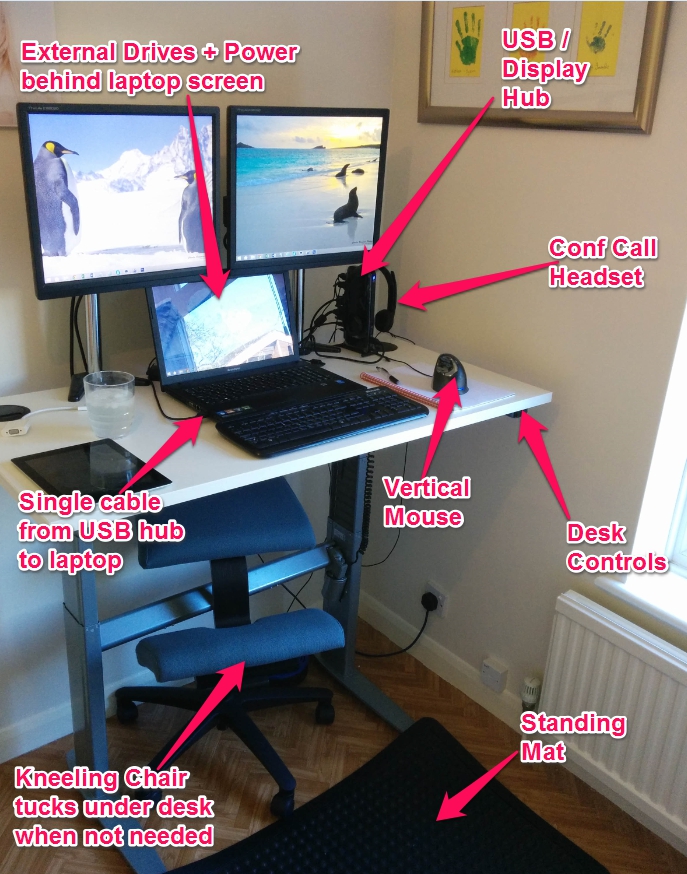
This is how it always looks, I definitely didn’t tidy it for the photo!
 Fusion Tipster